Start or skip
Add customer details now, or jump straight into the scan and complete them later.

Windows and Mac network field toolkit for AV technicians
Walk onto a job, scan once, and keep working. Organize devices by room, measure Wi-Fi, run diagnostics, ask Codex to explain the project evidence, and leave with a professional report.
Windows and Mac available now · From $149 · One year of updates included
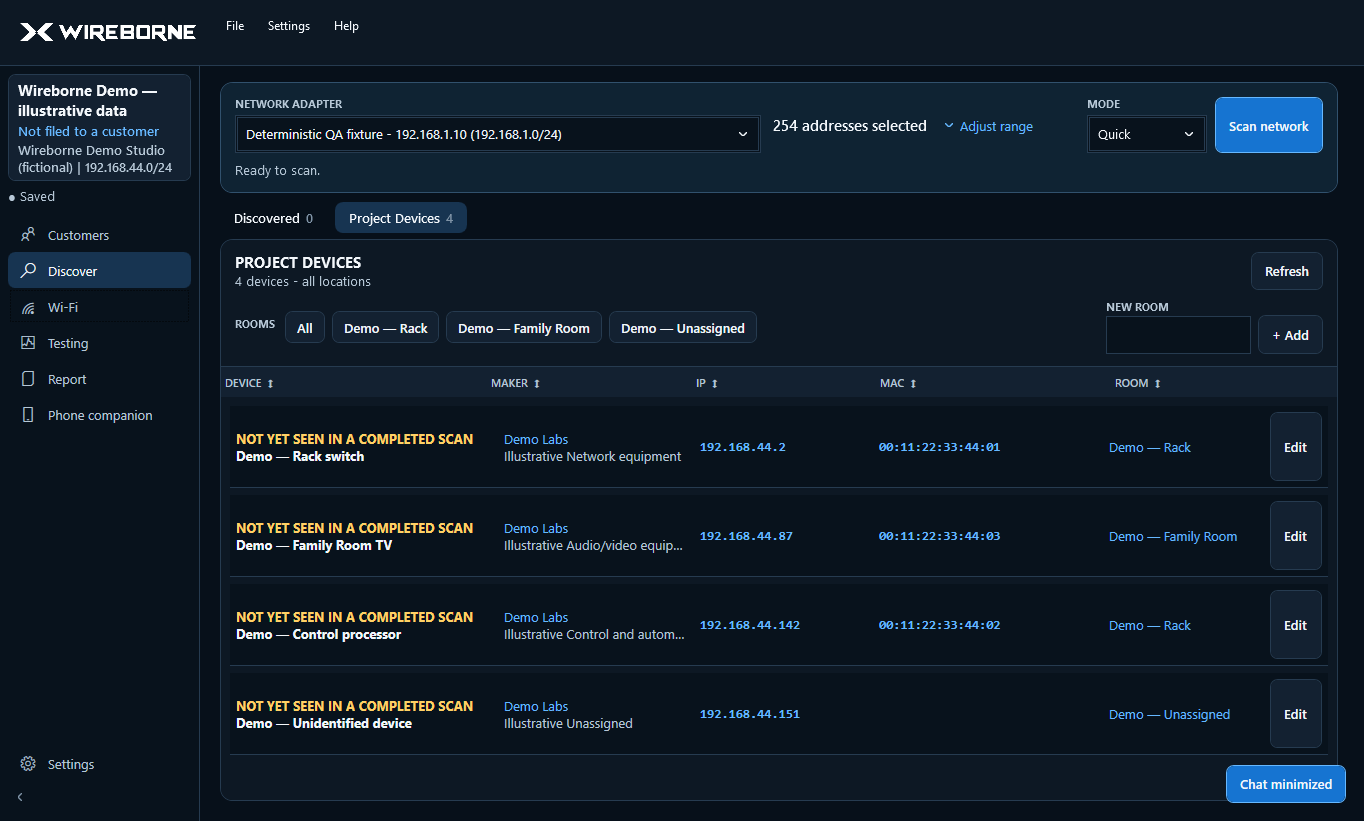
One practical workspace
Free scanners are excellent at answering “what is online?” Wireborne is built for the rest of the job: what the device is, where it lives, whether the connection is healthy, what changed, and what you hand to the client.
Add customer details now, or jump straight into the scan and complete them later.
Choose a network adapter and readable start/end IP range, then run Quick or Thorough discovery.
Sort, copy, edit, and drag devices into the project. Rooms, names, types, and notes stay optional.
Capture all-band Wi-Fi snapshots by location and diagnose both internet and local connections.
Use the local phone companion to identify equipment, add rooms, and photograph network settings.
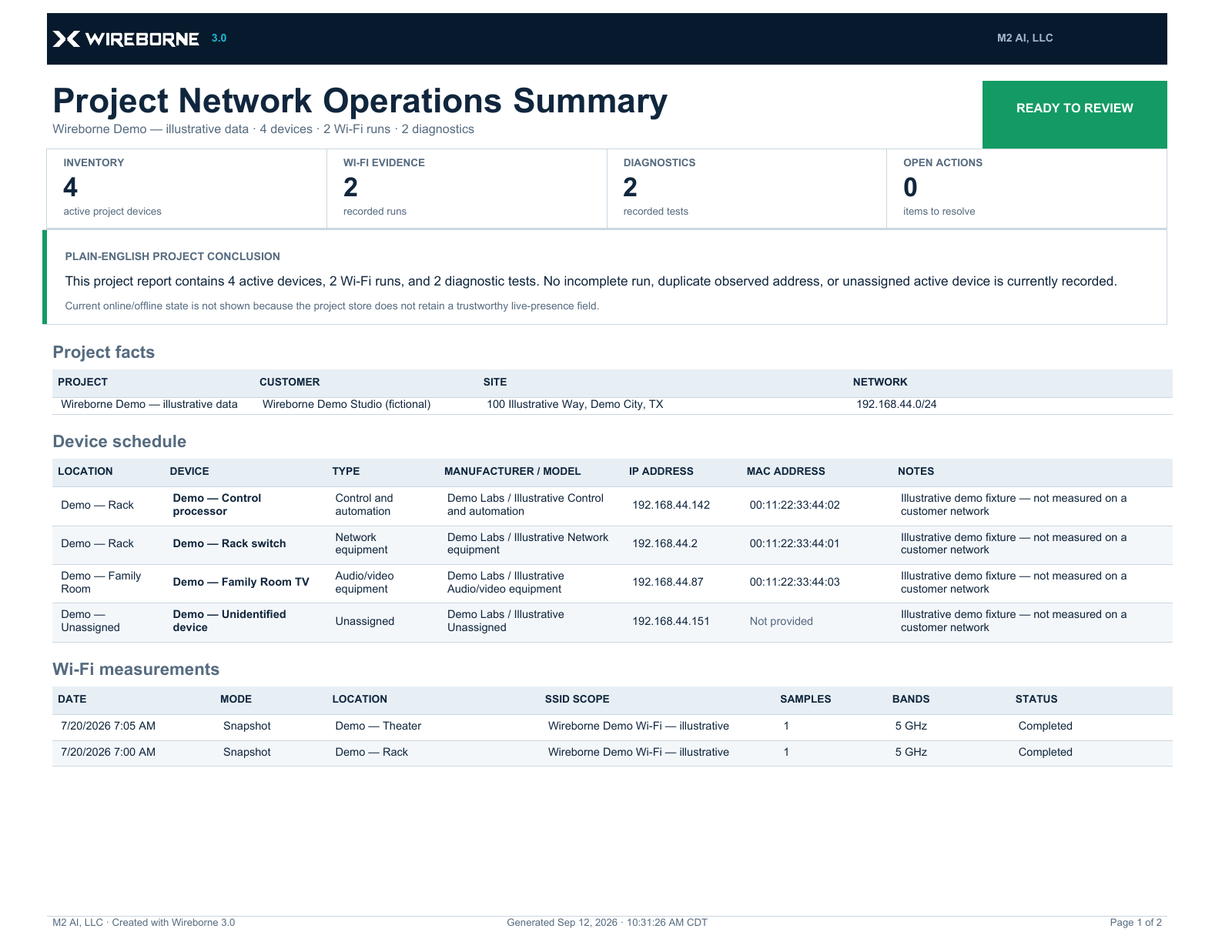
Reopen the project later and generate a branded PDF for the customer or service record.
Optional Codex field copilot
Codex works with the project already open in Wireborne—not as a blank chatbot. Ask what changed, why a device may be unreachable, how Wi-Fi and diagnostics relate, or what deserves attention before closeout. Answers cite the project records behind them.
Request a project summary, device reasoning, baseline comparison, IP-planning help, or a deeper closeout review in plain English.
Correlate devices, scan history, Wi-Fi, internet and local diagnostics, Network Validation, AV profiles, and reports without manually cross-referencing every screen.
Open supported project views and cited results, then get packet loss, jitter, link rate, and missing measurements explained in field-friendly language.
Codex can request bounded Wireborne actions, such as a reachability test, but you review the exact action first. It cannot run arbitrary commands or change network equipment.
Why it matters: less time hunting through screens, faster troubleshooting, clearer customer explanations, and a more complete closeout. Requires an eligible ChatGPT subscription and the official Codex CLI. Wireborne works normally without Codex and never reads or stores your ChatGPT credentials.
Field workspace
Discovered Devices remains the complete scan result. Project Devices is your curated job record, so adding a device never removes the original or its test action.
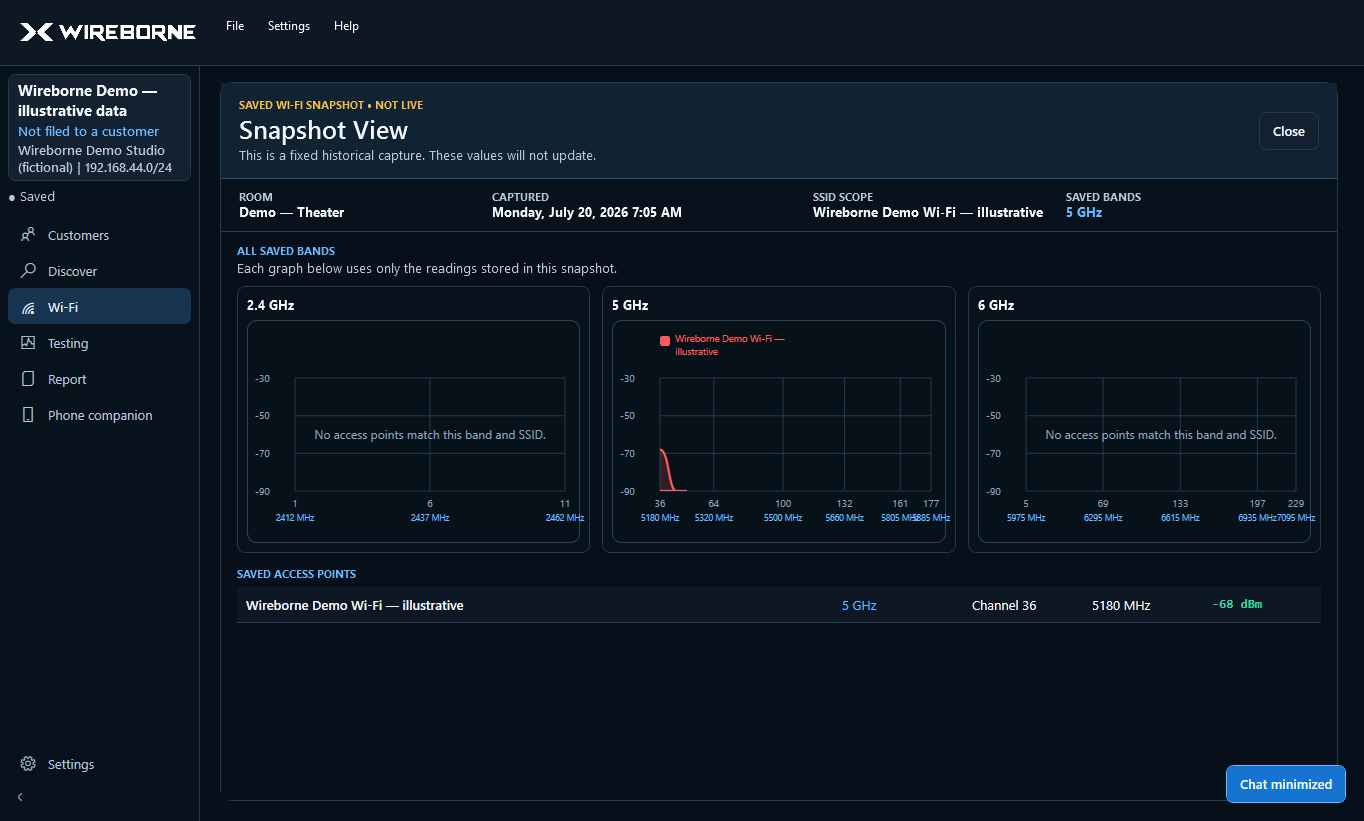
Wi-Fi analyzer
Continuously monitor nearby networks across supported bands. Focus on one SSID, compare channels, and preserve a room-tagged snapshot without leaving the analyzer.
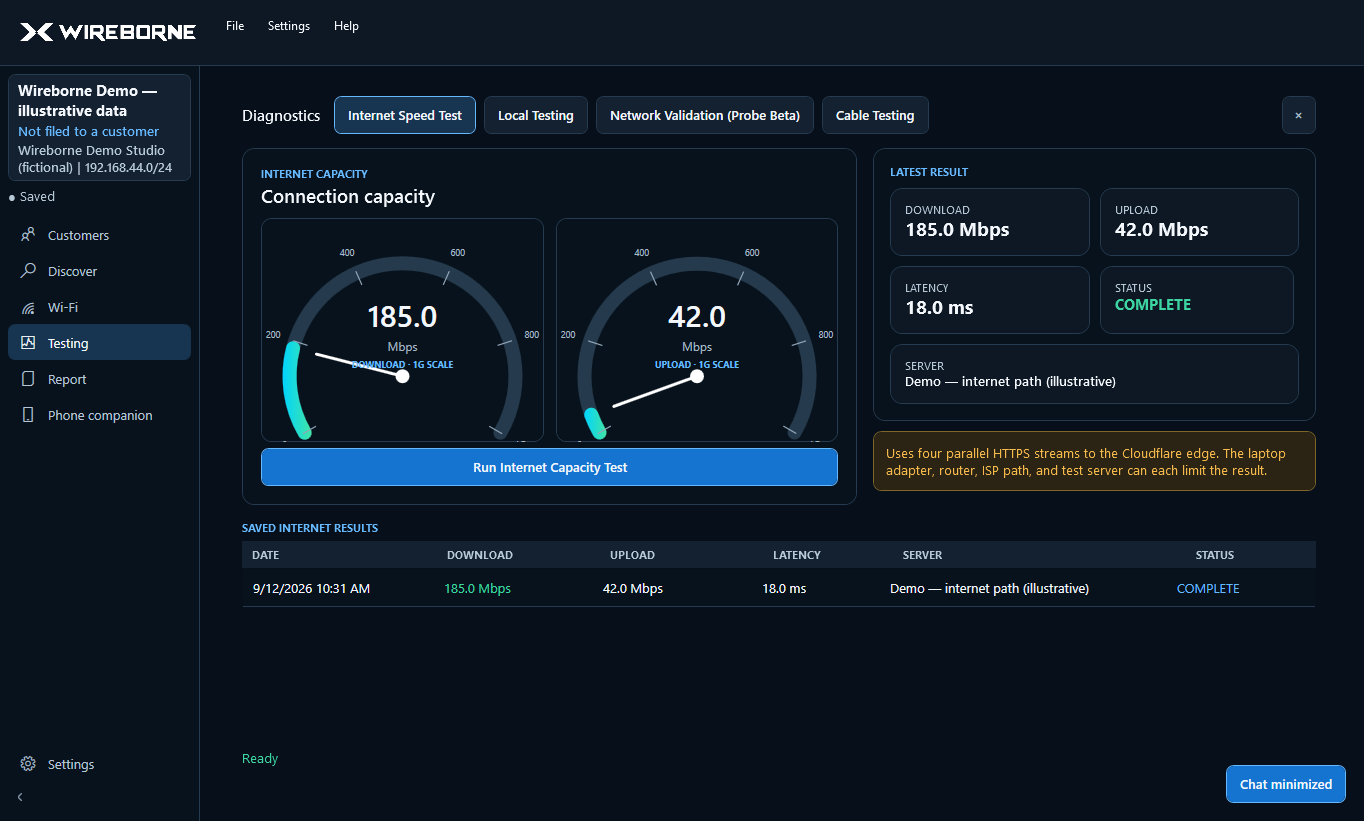
Diagnostics
Two focused views make results easier to explain. Internet testing uses independent download and upload gauges; Local Testing targets a discovered device or a manually entered IP.
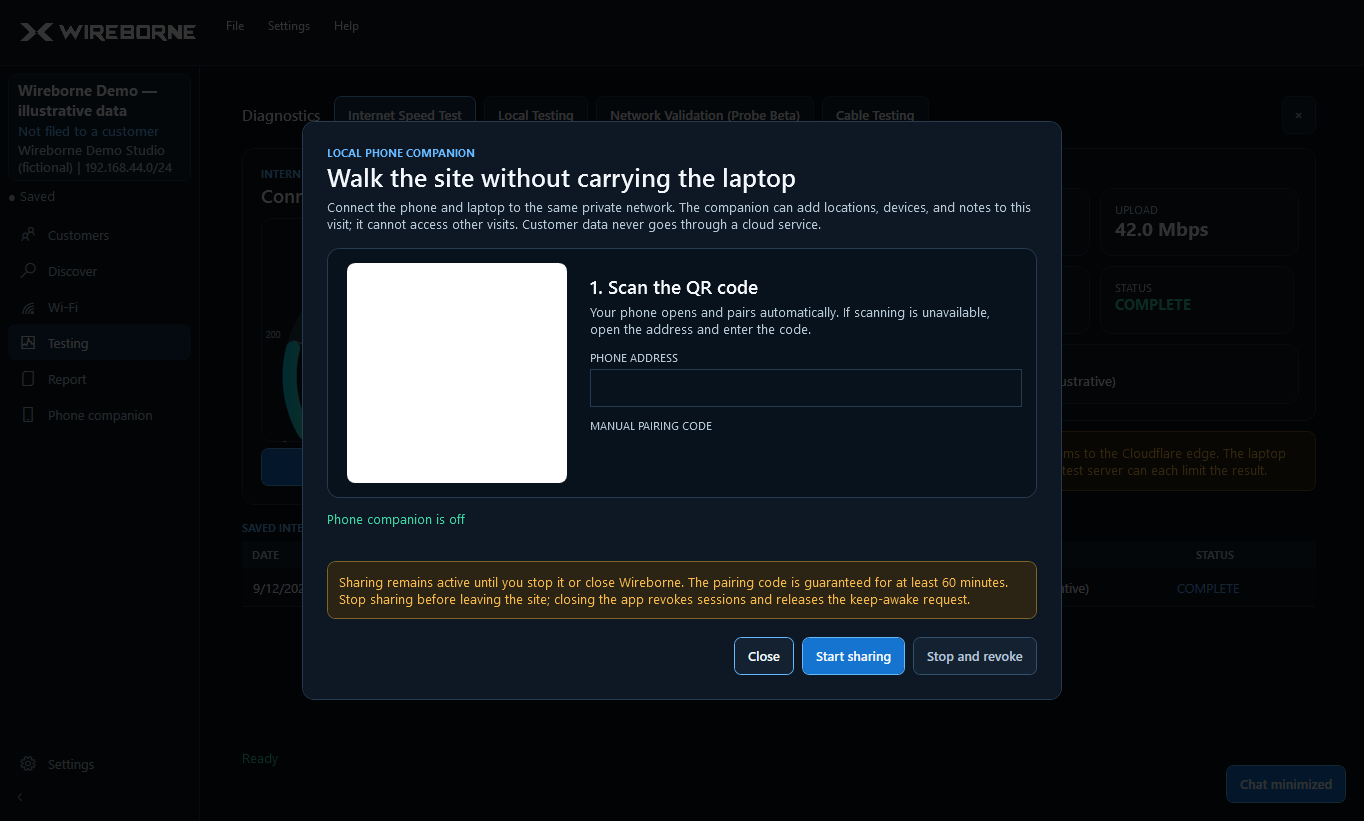
Phone companion
Scan a local QR code and use a mobile-friendly companion on the same network. The session remains available for at least 60 minutes or until you close it, while Wireborne keeps the laptop awake.
Branded reporting
Add your company name, contact details, and logo once in Settings. Wireborne turns the saved project into a properly paginated PDF with your branding.
The practical difference
Advanced IP Scanner is a capable free choice for a quick Windows network list and remote-access workflow. Wireborne is for technicians who need to organize the visit, diagnose it, preserve it, and report it.
Comparison checked July 18, 2026. See the full feature-by-feature comparison.
Built in the field
Most network scanners stop after they find the devices. An AV service visit does not. You still need to identify the equipment, place it in a room, test the connection, capture what you found, and leave behind a useful record.
Richard Machemehl built Wireborne after 23 years working in AV integration and founding Executive Technology Group in 2003. It is the network tool he wanted to carry into real homes and businesses: one workspace designed around the way an AV installer actually finishes a job.
Screenshot guides
Short, task-focused guides explain what each screen does, what to expect, and how to interpret the results.
Install, activate, create or skip customer details, and run the first scan.
02Adapters, IP ranges, Quick versus Thorough, sorting, and project devices.
03Live channels, SSID focus, snapshots, and roaming surveys.
04Internet gauges, multi-gig scaling, local targets, and saved results.
05QR connection, discovered devices, photos, OCR, rooms, and types.
06Add company branding and produce a client-ready project report.
Straightforward licensing
Both licenses include one year of updates. If update coverage ends, your licensed version keeps working.
$149first year
One technician — any mix of Windows and Mac computers.
$299first year
Shops with multiple techs and platforms.
Secure purchase and licensed download through Lemon Squeezy
Windows and Mac are available through Lemon Squeezy. Existing 2-PC and 5-PC licenses cover any mix of Windows and Mac computers with the same activation limit and update coverage. Download Wireborne.
Straight answers
Wireborne is a field toolkit for Windows and Mac that helps AV technicians and network installers scan a client network, organize devices by room, test Wi-Fi and network performance, and create a branded PDF report.
A free scanner is useful for quickly listing devices. Wireborne keeps that scan inside a persistent job workflow with rooms, notes, project devices, Wi-Fi snapshots, diagnostics, phone-assisted documentation, saved projects, and branded reports.
No network scanner can guarantee that. Wireborne correlates MAC vendor data and network discovery evidence, keeps uncertain results visible, and lets you correct names, types, rooms, and notes.
Wireborne presents 2.4 GHz, 5 GHz, and 6 GHz views when those networks are reported by the connected computer's Wi-Fi adapter and driver. Hardware and regional support determine what can be observed.
The optional Codex field copilot can summarize and connect evidence from the active project, explain likely causes and missing measurements in plain language, cite the records behind its answer, open supported project views, and request bounded actions for your approval. It requires an eligible ChatGPT subscription and the official Codex CLI.
Project files, scan data, snapshots, images, and reports are stored locally. The phone companion communicates on the local network. If you explicitly connect Codex in Settings, governed and sanitized evidence from the active project may be shared in Codex chats; credentials, customer identity, licensing data, branding, photos, and other projects are excluded. Licensing also requires occasional online validation and supports a 30-day offline grace period after a successful validation.
$149 for a 2-PC license or $299 for a 5-PC license. Both include one year of updates. After that, update coverage is $59 per year for 2 PCs or $119 per year for 5 PCs. If you do not renew, the licensed version you already have keeps working.
Yes. Existing 2-PC and 5-PC licenses cover any mix of Windows and Mac computers under the same activation limit and update coverage. Download Wireborne through Lemon Squeezy.
Yes. Choose a 2-PC or 5-PC license through Lemon Squeezy. The Windows installer is available now; the Mac download page shows its release status.
Questions
Product, support, or purchasing questions go straight to the founder — not a ticket queue. Ready to buy? Choose a 2-PC or 5-PC license.